
Explainer
Job Search AI Agent: How Automated Applications Work
Learn how a job search AI agent finds matching roles every day, refines filters through conversation, and drafts tailored application materials for review.
 Zeeshan AhmadJul 12, 2026
 Mughees RehmanJul 12, 2026
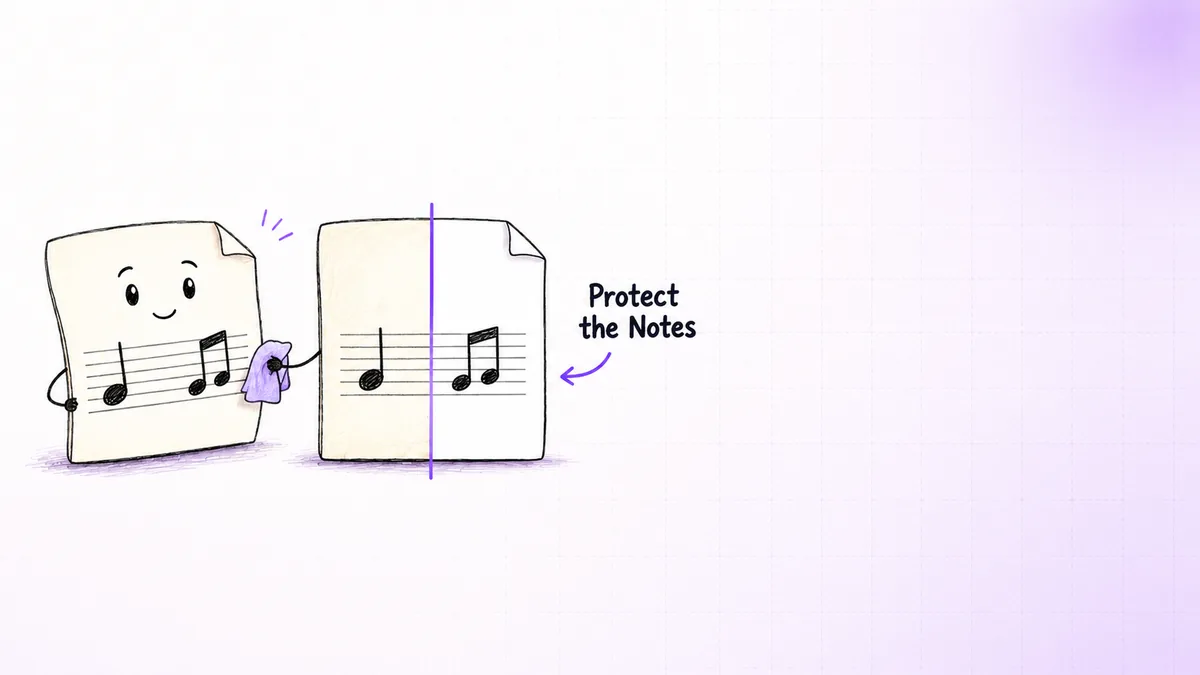
Colored paper, scanner shadows, and yellowed stock can turn a readable music score into a PDF that wastes toner and loses noteheads when someone applies a blunt black-and-white filter. A PDF background remover AI system handles the problem differently: it treats every page as a document image, identifies what belongs to the background, protects notation and text, then rebuilds the file for review or printing.
That distinction matters because a PDF may contain editable vector objects, one full-page scan, or a mixture of text, images, annotations, and transparency. A command that removes a true PDF background object will not clean a background baked into scanned pixels. In 2025, Gartner reported that the intelligent document processing market contained more than 100 vendors, yet general document tools are usually designed around text extraction rather than preserving thin staff lines and musical symbols (Gartner, Magic Quadrant for Intelligent Document Processing Solutions). :contentReference[oaicite:0]{index=0}
The practical challenge is therefore not “make the page white.” It is “make the page white without erasing information that looks visually similar to noise.”
A dependable cleanup system separates document structure, image correction, and quality control.
A PDF background cleanup system decides which pixels are paper and which pixels carry meaning, then replaces only the paper-like pixels with white. For scanned music, the meaningful pixels include more than text: five-line staves, note stems, beams, dynamics, slurs, and sometimes colored annotations all need protection. In 2026, Tesseract’s image-quality guidance still recommended input around 300 dpi for reliable recognition, which is also a sensible working resolution for preserving small printed details (Tesseract, Improving the Quality of the Output). :contentReference[oaicite:2]{index=2}
PDF background remover AI usually works as a three-part pipeline: inspect the page, create a foreground mask, then rebuild and verify the document. In 2026, PyMuPDF’s official examples showed that a PDF page can be rendered directly at 300 dpi with page.get_pixmap(dpi=300), preserving the resolution value in the output image (PyMuPDF, Images Recipes). :contentReference[oaicite:3]{index=3}
The first step is to determine whether the unwanted color is a removable PDF object or part of a scanned image. Native PDFs may store a page-sized object behind vector notation. Scanned PDFs commonly store each page as one raster image, so there is no separate background to delete. The PDF Association’s PDF/Raster specification describes this scanned-document model as a multi-page container for raster images. :contentReference[oaicite:4]{index=4}
A parser such as PyMuPDF can inspect image objects, drawings, text blocks, page dimensions, and transparency. If the background is a distinct object, object removal preserves the original vectors. If the page is a scan, the workflow renders it for pixel processing.
This is also where a PDF background text remover needs careful interpretation. Repeated text may be a watermark object that can be deleted, but text visible inside a flattened scan must be separated by image analysis. Treating both cases alike can remove valid titles, rehearsal marks, or copyright lines.
The second step is to model the unwanted color without assuming that every page has one uniform shade. A yellow scan may be pale in the center, darker near the binding, and gray at the edges. Global thresholding uses one cutoff for the entire page, which often breaks under uneven lighting. OpenCV’s adaptive thresholding guidance instead calculates thresholds from local neighborhoods, allowing different parts of the page to receive different decisions. :contentReference[oaicite:5]{index=5}
A practical pipeline converts the page into luminance and color channels, estimates the background field, and compares each pixel with its local background. Dark, high-frequency structures become foreground candidates. Color-distance rules can preserve blue fingering notes or red teacher marks while neutralizing yellow paper.
This is the real mechanism behind a PDF to PNG background remover workflow: render each page to a lossless PNG, process the pixels, then write the cleaned page back into a PDF. PNG is preferred during processing because repeated JPEG encoding can add block artifacts around thin notation.
The third step is to preserve connected musical shapes before producing the final file. Staff lines, note stems, and dots may occupy only a few pixels. Aggressive erosion can erase them, while heavy sharpening can join symbols that should remain separate. The mask therefore needs notation-aware safeguards such as minimum line continuity, connected-component checks, and comparison against the original page.
After cleanup, the system places each processed page back at its original physical size, applies suitable compression, and optionally adds OCR for titles or lyrics. OCRmyPDF warns that --clean-final inserts processed imagery into the output and should be reviewed because cleanup may remove meaningful content. :contentReference[oaicite:6]{index=6} The same caution applies even more strongly to sheet music.
Remove Background of PDF handles this layer by preserving notation, producing print-ready pages, and routing uncertain results for review rather than silently accepting every page. A validator compares foreground loss, page dimensions, blank-page risk, and visual difference thumbnails before accepting a batch.
The strongest use cases are scanned collections where background color varies but the foreground follows repeatable visual rules. In 2025, the OmniDocBench project evaluated 1,651 PDF pages across 10 document types and 5 layout types, illustrating why document pipelines must cope with varied page structures rather than assume one universal layout (OmniDocBench benchmark repository). :contentReference[oaicite:7]{index=7}
Colored music-sheet archive: A choir has 600 scanned pages on cream, blue, and light green paper. The automation groups pages by color profile, estimates a background model for each group, preserves black notation plus selected annotations, and exports a white-background PDF. Pages with unusually high foreground loss go into a review folder.
JPG collection converted to PDF: A teacher has phone photos that need a JPG to PDF remove background process. The workflow corrects perspective, crops edges, removes lighting gradients, and then assembles the pages. Cleaning before PDF creation avoids embedding already-compressed, poorly aligned images into the final file.
Mixed native and scanned PDF: A publisher receives a file containing vector title pages and scanned score pages. An Adobe PDF background remover or PDF-XChange Editor remove background command may remove page backgrounds that exist as PDF objects. Adobe’s current desktop instructions use Edit, Background, Remove, while PDF-XChange PDF-Tools provides a Remove Page Backgrounds feature. :contentReference[oaicite:8]{index=8} The scanned pages still need pixel cleanup.
The important observation is that page classification often creates more value than the “AI” label. A system that chooses the correct method per page is safer than a more sophisticated model forced to process every page identically.
PDF background remover AI matters when manual editing is inconsistent, printing cost is visible, or damaged notation creates downstream rework. In 2025, Gartner’s review of more than 100 intelligent document processing vendors showed how broad the category has become, but specialist workflows still depend on domain-specific validation rules. :contentReference[oaicite:9]{index=9}
Batch consistency removes page-by-page guesswork: the same color model, resolution, crop policy, and compression settings can be applied across an archive, while exceptions are logged instead of hidden.
Print output becomes predictable: a system built to remove background color from PDF for printing can replace tinted paper with white while retaining black density and page dimensions. Test prints should still cover the palest notation, the darkest background, and any colored annotations.
remove background of pdf files in batches while preserving music notation and producing print-ready sheets.
Originals remain recoverable: the source PDF should be immutable, with cleaned files written to a new location and linked through a processing manifest. A manifest can record page count, hashes, selected profile, and review status.
Quality control becomes measurable: rather than asking whether a page “looks cleaner,” the pipeline can report changed-pixel percentage, foreground loss, skew correction, and pages that exceeded a chosen threshold. Review every flagged page plus a regular sample from each batch.
If tinted pages keep reaching print or staff repeatedly correct the same defects, start with a representative test set containing clean pages, difficult pages, colored annotations, and known failure cases. A 20-page sample can reveal whether one rule set works or multiple profiles are needed.
Background removal depends first on whether the PDF contains editable objects or flattened scans. In 2025, Adobe documented a three-action desktop path for removable backgrounds: open Edit, choose Background > Remove, and confirm the change (Adobe, Remove Background from PDFs). :contentReference[oaicite:10]{index=10}
A removable PDF background can be deleted with Acrobat or PDF-XChange when it exists as a separate object. An online PDF editor remove background tool may work for simple files, but scanned pages need raster cleanup because the paper color and notation are stored in the same image.
Background color should be removed by deleting the page background object in a native PDF or by applying local color and luminance thresholds to a scan. The PDF-XChange Editor remove background route is suitable for structured backgrounds, while flattened scans require image processing and review.
An image background inside a PDF can be cleaned by extracting the image or rendering the full page, processing it as PNG, and rebuilding the page at the original size. Extraction is preferable when one image fills the page; rendering is safer when the page mixes images, vectors, masks, and text.
A print-ready PDF should use white or near-white background pixels, preserved foreground density, original page dimensions, and a resolution near 300 dpi. A remove background color from PDF for printing workflow should include a physical test print because screens do not reveal toner use, faint line loss, or printer scaling errors reliably.
A gray scanned background is best removed with background estimation plus adaptive thresholding rather than one global cutoff. The local method handles shadows and uneven exposure, while a foreground mask protects thin text and notation from being mistaken for gray noise.
A yellow background can be neutralized by measuring color distance from the estimated paper tone and replacing only matching pixels with white. Colored annotations need separate protection rules, especially when red, orange, or pale pencil marks sit close to the paper color in the chosen color space.
A black scanned background can be handled by detecting inverted pages, reversing luminance, and then applying normal cleanup rules. A PDF black background remover should confirm that the page is truly inverted before changing it, because dark photographs, filled boxes, and cover artwork may be intentional.
PDF background remover AI is useful when unwanted color is embedded in scanned pixels and the foreground must survive repeatable batch processing. In 2026, OCRmyPDF still advised reviewing final cleaned imagery because preprocessing can remove meaningful content, which is the right standard for music notation. :contentReference[oaicite:11]{index=11} The sound approach classifies pages, cleans locally, rebuilds at print resolution, and flags uncertain results. For a production example, see CogworkLabs’ remove background of PDF automation.
Learn how a job search AI agent finds matching roles every day, refines filters through conversation, and drafts tailored application materials for review.
Zeeshan AhmadJul 12, 2026
Use a free task tracker template google sheets teams can adapt before deciding when to move from spreadsheets to a custom project app.
 Awais AhmadJul 12, 2026
Compare the best automated label printing solutions for warehouses 2026, including workflow fit, error recovery, scalability, and when custom automation wins.
Awais AhmadJul 12, 2026