Integration Guide
Pipedrive Marketing Automation Integration Guide
Learn how pipedrive marketing automation integration with sales crm helps B2B teams connect lead sources, automate handoffs, and improve follow-up.
 Zegham AliJul 12, 2026
 Mughees RehmanJul 13, 2026
HubSpot AI assistant integration with email marketing matters because a busy shared inbox turns good CRM data into slow, inconsistent replies unless drafting, review, and sending are treated as one controlled workflow. In 2025, the Microsoft Work Trend Index found that the average worker received 117 emails per day, with most messages skimmed in under a minute.
The useful pattern is not “let AI answer customers.” It is: capture the message, attach the correct CRM record, assemble only relevant context, generate a draft, route it to a person, and log the final send. That distinction matters because generic text generation is easy; reliable record selection, approval, and exception handling are the production work.
In 2025, McKinsey found regular organizational AI use had risen from 78% to 88%, while many organizations were still piloting rather than scaling (McKinsey & Company, The State of AI: Global Survey 2025). The practical opportunity is therefore controlled adoption, not unsupervised sending.
<figure> <style> .c1 { --surface:#fcfcfb; --ink-1:#0b0b0b; --ink-2:#52514e; --muted:#898781; --grid:#e1e0d9; --accent:#2a78d6; --accent-2:#1baf7a; --negative:#c05a3e; font-family:system-ui, sans-serif; } @media (prefers-color-scheme: dark){ .c1 { --surface:#1a1a19; --ink-1:#ffffff; --ink-2:#c3c2b7; --muted:#898781; --grid:#2c2c2a; --accent:#3987e5; --accent-2:#199e70; --negative:#d0674a; } } </style> <svg class='c1' viewBox='0 0 560 380' role='img' aria-label='Line chart showing organizations reporting regular AI use rising from 78 percent in the previous survey to 88 percent in the 2025 survey.'> <rect x='0' y='0' width='560' height='380' fill='var(--surface)'/> <text x='28' y='34' font-size='18' font-weight='700' fill='var(--ink-1)'>Organizations Reporting Regular AI Use</text> <text x='28' y='56' font-size='12' fill='var(--ink-2)'>Percent of survey respondents reporting regular use</text> <line x1='70' y1='300' x2='520' y2='300' stroke='var(--grid)' stroke-width='1'/> <line x1='70' y1='258' x2='520' y2='258' stroke='var(--grid)' stroke-width='1'/> <line x1='70' y1='216' x2='520' y2='216' stroke='var(--grid)' stroke-width='1'/> <line x1='70' y1='174' x2='520' y2='174' stroke='var(--grid)' stroke-width='1'/> <line x1='70' y1='132' x2='520' y2='132' stroke='var(--grid)' stroke-width='1'/> <line x1='70' y1='90' x2='520' y2='90' stroke='var(--grid)' stroke-width='1'/> <text x='58' y='304' text-anchor='end' font-size='11' fill='var(--muted)'>0</text> <text x='58' y='262' text-anchor='end' font-size='11' fill='var(--muted)'>20</text> <text x='58' y='220' text-anchor='end' font-size='11' fill='var(--muted)'>40</text> <text x='58' y='178' text-anchor='end' font-size='11' fill='var(--muted)'>60</text> <text x='58' y='136' text-anchor='end' font-size='11' fill='var(--muted)'>80</text> <text x='58' y='94' text-anchor='end' font-size='11' fill='var(--muted)'>100</text> <polyline points='150,136.2 440,115.2' fill='none' stroke='var(--accent)' stroke-width='2.5' stroke-linecap='round' stroke-linejoin='round'/> <circle cx='150' cy='136.2' r='4' fill='var(--accent)'/> <circle cx='440' cy='115.2' r='4' fill='var(--accent)'/> <text x='150' y='121' text-anchor='middle' font-size='16' font-weight='700' fill='var(--ink-1)'>78%</text> <text x='440' y='100' text-anchor='middle' font-size='16' font-weight='700' fill='var(--ink-1)'>88%</text> <text x='150' y='326' text-anchor='middle' font-size='13' fill='var(--ink-2)'>Previous survey</text> <text x='440' y='326' text-anchor='middle' font-size='13' fill='var(--ink-2)'>2025 survey</text> <text x='28' y='360' font-size='11' fill='var(--muted)'>Takeaway: regular AI use rose by 10 percentage points.</text> </svg> <figcaption>Source: McKinsey & Company, The State of AI: Global Survey 2025.</figcaption> </figure>A dependable setup connects the shared inbox to the right HubSpot records, gives the model the minimum useful context, requires human approval, and tracks follow-ups as explicit CRM states. In 2026, Salesforce found sellers expected mature AI agents to reduce email-drafting time by 36% (Salesforce, State of Sales 2026).
<iframe width="560" height="315" src="https://www.youtube.com/embed/OHJQe8kI5h4" title="HubSpot AI email marketing integration overview" frameborder="0" allow="accelerometer; autoplay; clipboard-write; encrypted-media; gyroscope; picture-in-picture; web-share" allowfullscreen></iframe>Key point: Treat AI as a draft-producing component inside an auditable email process, not as the sender of record. Clean CRM data, UK GDPR controls, document-status fields, and measurable tests are what make the workflow safe enough for staff use.

Photo by Mikhail Nilov on Pexels
You need a connected HubSpot inbox, permission to configure AI and workflows, usable CRM fields, an approval owner, and a documented decision about whether native HubSpot features are sufficient. In 2026, HubSpot documented separate AI controls for three data sources—CRM data, customer conversations, and files—and required Super Admin access to manage them (HubSpot, Manage AI Settings).
Use native features when staff mainly need help drafting marketing, sales, or service copy inside HubSpot. Use a custom workflow when the draft must combine several record types, enforce a review queue, check document states, call an external model, or apply business-specific fallback rules.
HubSpot's custom LLM workflow actions are documented for Enterprise subscriptions and support five providers: OpenAI, Anthropic, Cohere, xAI, and Google Gemini. A separate middleware service is still useful when you need versioned prompts, provider failover, attachment parsing, or a central audit log outside HubSpot.
Confirm the HubSpot subscription, shared addresses, domain authentication, workflow permissions, ticket access, and who may see customer files. Prepare contact, company, deal, ticket, event, supplier, and document-status fields before connecting the model. Also record the lawful basis, retention rule, processor terms, and escalation owner so privacy decisions are part of the build rather than a late review.
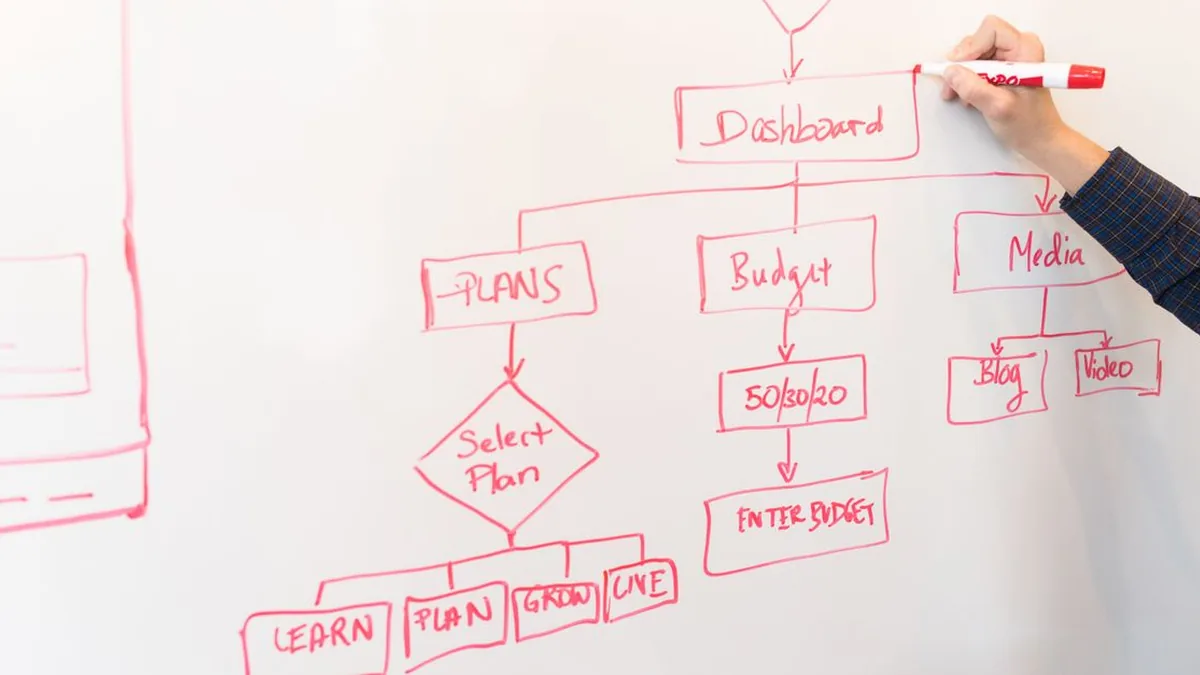
Photo by Christina Morillo on Pexels
Map the workflow as a state machine so every incoming email has a known trigger, context source, reviewer, outcome, and failure path. HubSpot's workflow model is built around enrollment, actions, branches, and history, so the design should be explicit enough to reproduce in configuration and later audit through the workflow tools.
Classify messages before drafting. Sales enquiries may need deal stage, product interest, owner, and prior contact. Customer-service replies may need ticket status, entitlement, recent troubleshooting, and service policy. Supplier messages may need event date, deliverable, contract status, and document dependencies.
Use a deterministic rule first—recipient address, form source, ticket pipeline, or associated record type—then use AI classification only for ambiguous messages. Deterministic routing is easier to test and prevents a vague subject line from sending a supplier request into a sales sequence.
Allow AI to draft routine acknowledgements, status updates, missing-information requests, and approved policy explanations. Route complaints, refunds, contract changes, safeguarding concerns, legal threats, unusual pricing, and unclear attachments directly to a person.
The boundary should be written as rules, not left to reviewer instinct. A useful design names the allowed message categories, disallowed claims, required fields, confidence threshold, escalation reason, and who can override the route.
Define the destination state before building the trigger. A sales enquiry might end as draft ready, needs qualification, or assign to owner. A document request might end as complete, missing item, invalid file, or staff decision required.
Include the audit data in the map: source message identifier, associated record, prompt version, context fields used, model output, reviewer, edits, send timestamp, and final status. That record is what lets you investigate a wrong draft without guessing which input caused it.

Photo by Gustavo Fring on Pexels
CRM preparation is the highest-leverage part of the integration because the model can only draft from the records it receives. In 2025, IBM found poor data availability and quality was the leading barrier to agentic AI adoption at 53% (IBM Institute for Business Value, State of Salesforce 2025–2026).
Create fields that answer the actual reply question. Typical examples include preferred name, account owner, enquiry type, deal stage, service tier, ticket priority, promised date, event date, supplier role, document required, document status, validation result, and next follow-up date.
Use controlled options for operational states rather than free text. A property such as document_status should hold agreed values like requested, received, approved, rejected, or not applicable. The model can then explain a state without interpreting inconsistent notes.
Create and govern these fields through HubSpot's property management tools, and associate records deliberately. A contact linked to several companies or tickets needs an active-context rule, otherwise the draft may borrow the wrong commercial details.
Reject incomplete context before generation. If the email asks about a delivery date and the CRM date is empty, the workflow should request staff input rather than let the model infer one. If the ticket says “resolved” but the latest customer message reports a continuing problem, route the conflict to review with both facts visible.
Add validation where data enters HubSpot. Standardize date formats, owner fields, status values, and duplicate rules. For high-impact properties, store the source and last verified time so reviewers can judge whether the value is current.
Give the drafting workflow access only to fields needed for the message category. Marketing staff do not need every support note; an external model does not need an entire file repository to draft a meeting reminder.
Limit who can edit prompts, enable AI data sources, change routing, approve sensitive replies, or export logs. Pair HubSpot permissions with model-provider controls, processor agreements, and secrets management. The safest context packet is the smallest one that still lets a reviewer accept the draft without reopening several records.

Photo by cottonbro studio on Pexels
Connect each shared address to the correct HubSpot channel, then prove that every new message creates or updates the intended CRM record once. HubSpot's conversations inbox connection process is the native foundation; custom processing should start only after HubSpot has captured the message and association reliably.
Connect addresses by purpose rather than forwarding everything into one mailbox. A sales address can feed lead qualification, while a support address can create or update tickets. Supplier or event-document mail may deserve a separate channel because its routing and retention rules differ from customer support.
Use authenticated sending domains and a named team address. Decide whether staff reply from the conversations inbox, help desk, or their personal connected inbox, because the sending identity affects threading, ownership, and what HubSpot logs.
Route first with stable metadata: mailbox, pipeline, form source, ticket category, associated deal, or supplier flag. Then apply text classification for cases that cannot be separated reliably by fields.
Prevent duplicate processing with a unique message identifier and a processed timestamp. A workflow that re-enrolls on every property update can otherwise create repeated drafts or reminders. Keep a terminal state that blocks re-entry unless a genuinely new inbound message arrives.
Test existing contacts, unknown senders, forwarded messages, aliases, and contacts tied to several open tickets. The workflow should either select the correct active record or stop with a clear exception.
Inspect the thread, record timeline, ticket association, owner, and source message identifier. A correct draft attached to the wrong ticket is still a production failure because the reviewer sees misleading context and the audit trail points to the wrong case.
<iframe width="560" height="315" src="https://www.youtube.com/embed/-jAwB84W-Zs" title="Connecting and routing HubSpot shared inbox messages" frameborder="0" allow="accelerometer; autoplay; clipboard-write; encrypted-media; gyroscope; picture-in-picture; web-share" allowfullscreen></iframe>
Photo by www.kaboompics.com on Pexels
CRM-aware drafting works when the workflow assembles a small, verified context packet and gives the model a narrow writing task. In 2026, Salesforce found sellers expected mature AI agents to reduce prospect-research time by 34% and email-drafting time by 36% (Salesforce, State of Sales 2026).
<figure> <style> .c2 { --surface:#fcfcfb; --ink-1:#0b0b0b; --ink-2:#52514e; --muted:#898781; --grid:#e1e0d9; --accent:#2a78d6; --accent-2:#1baf7a; --negative:#c05a3e; font-family:system-ui, sans-serif; } @media (prefers-color-scheme: dark){ .c2 { --surface:#1a1a19; --ink-1:#ffffff; --ink-2:#c3c2b7; --muted:#898781; --grid:#2c2c2a; --accent:#3987e5; --accent-2:#199e70; --negative:#d0674a; } } </style> <svg class='c2' viewBox='0 0 560 380' role='img' aria-label='Grouped bar chart showing expected time reductions of 34 percent for prospect research and 36 percent for email drafting from mature sales AI agents.'> <rect x='0' y='0' width='560' height='380' fill='var(--surface)'/> <text x='28' y='34' font-size='18' font-weight='700' fill='var(--ink-1)'>Expected Time Reduction From Sales AI Agents</text> <text x='28' y='56' font-size='12' fill='var(--ink-2)'>Percent reduction sellers expect from mature implementations</text> <line x1='70' y1='300' x2='520' y2='300' stroke='var(--grid)' stroke-width='1'/> <line x1='70' y1='245' x2='520' y2='245' stroke='var(--grid)' stroke-width='1'/> <line x1='70' y1='190' x2='520' y2='190' stroke='var(--grid)' stroke-width='1'/> <line x1='70' y1='135' x2='520' y2='135' stroke='var(--grid)' stroke-width='1'/> <line x1='70' y1='80' x2='520' y2='80' stroke='var(--grid)' stroke-width='1'/> <text x='58' y='304' text-anchor='end' font-size='11' fill='var(--muted)'>0</text> <text x='58' y='249' text-anchor='end' font-size='11' fill='var(--muted)'>10</text> <text x='58' y='194' text-anchor='end' font-size='11' fill='var(--muted)'>20</text> <text x='58' y='139' text-anchor='end' font-size='11' fill='var(--muted)'>30</text> <text x='58' y='84' text-anchor='end' font-size='11' fill='var(--muted)'>40</text> <rect x='145' y='113' width='100' height='187' rx='4' fill='var(--accent)'/> <rect x='335' y='102' width='100' height='198' rx='4' fill='var(--accent-2)'/> <text x='195' y='101' text-anchor='middle' font-size='16' font-weight='700' fill='var(--ink-1)'>34%</text> <text x='385' y='90' text-anchor='middle' font-size='16' font-weight='700' fill='var(--ink-1)'>36%</text> <text x='195' y='326' text-anchor='middle' font-size='13' fill='var(--ink-2)'>Prospect research</text> <text x='385' y='326' text-anchor='middle' font-size='13' fill='var(--ink-2)'>Email drafting</text> <text x='28' y='360' font-size='11' fill='var(--muted)'>Takeaway: email drafting shows the larger expected reduction.</text> </svg> <figcaption>Source: Salesforce State of Sales 2026.</figcaption> </figure>Build context by message type. A sales reply may need the latest inbound message, previous thread, contact name, company, owner, deal stage, requested service, and approved offer notes. A support reply may need ticket summary, status, recent actions, entitlement, and the relevant knowledge article.
Do not pass an unfiltered CRM record dump. Rank fields by necessity, remove empty values, label their source, and keep customer-written text separate from trusted company facts. That separation reduces prompt injection risk and makes it clear which content may be quoted as policy.
Tell the model what to produce, what facts it may use, and what to do when evidence is missing. A practical prompt includes the reply objective, audience, approved tone, facts, prohibited claims, escalation conditions, and output schema.
Ask for a subject suggestion, body, missing-information flags, and a short reviewer note. The reviewer note should explain which CRM facts were used and identify uncertainty. This is more useful than a polished paragraph that hides its assumptions.
Make uncertainty visible. When required fields are missing, output a draft that asks for the missing information or mark the item cannot draft. When two sources conflict, include both values in the reviewer note and prevent the model from choosing one.
Never let the prompt turn silence into permission. A missing discount, date, service level, or refund policy means escalation, not invention.
Write the generated text to a draft record, ticket note, approval queue, or custom object with status awaiting review. Store the prompt version, model, source message, context fields, generation time, and any safety flags.
The sending action must be separate and permissioned. A reviewer should be able to edit, reject, request regeneration, or approve, while the system records the final text rather than only the original model output.

Photo by Yan Krukau on Pexels
Human review and privacy controls are mandatory because the workflow handles customer communications and may expose personal data across several systems. In 2026, the UK government found 43% of businesses had identified a cyber breach or attack in the previous year, rising to 69% among large businesses (UK Department for Science, Innovation and Technology, Cyber Security Breaches Survey 2025/2026).
Keep generation and sending as separate permissions. The reviewer should see the incoming message, selected CRM facts, draft, warnings, attachment status, and intended recipient before approval.
Use escalation rules for sensitive categories, uncertain identity, conflicting records, unusual commercial terms, and low-confidence document checks. Approval should create a logged event; rejection should require a reason that can be reviewed during tuning.
State why each category of personal data is processed, how AI supports the communication, which processors receive data, and how customers can exercise their rights. Do not treat consent as the default answer; the lawful basis depends on the actual relationship and purpose.
In 2023, the Information Commissioner's Office described seven UK GDPR principles covering lawfulness, purpose limitation, data minimisation, accuracy, storage limitation, security, and accountability (ICO, Guide to the Data Protection Principles). Turn each principle into a configuration or operating control.
Send only fields required for the draft. Redact payment data, health details, identity documents, private notes, and unrelated attachments unless the approved use case genuinely needs them.
In 2025, PwC found 53% of consumers considered sharing personal information worthwhile for a smoother experience, but 93% said mishandling data would make them lose trust in a brand (PwC, 2025 Customer Experience Survey). Better personalization does not justify collecting or transmitting everything available.
<figure> <style> .c3 { --surface:#fcfcfb; --ink-1:#0b0b0b; --ink-2:#52514e; --muted:#898781; --grid:#e1e0d9; --accent:#2a78d6; --accent-2:#1baf7a; --negative:#c05a3e; font-family:system-ui, sans-serif; } @media (prefers-color-scheme: dark){ .c3 { --surface:#1a1a19; --ink-1:#ffffff; --ink-2:#c3c2b7; --muted:#898781; --grid:#2c2c2a; --accent:#3987e5; --accent-2:#199e70; --negative:#d0674a; } } </style> <svg class='c3' viewBox='0 0 560 380' role='img' aria-label='Donut chart showing 53 percent of consumers consider sharing personal information worthwhile for a smoother experience, while 47 percent are other respondents.'> <rect x='0' y='0' width='560' height='380' fill='var(--surface)'/> <text x='28' y='34' font-size='18' font-weight='700' fill='var(--ink-1)'>Consumers Willing to Share Data</text> <text x='28' y='56' font-size='12' fill='var(--ink-2)'>Views on sharing information for a smoother experience</text> <circle cx='180' cy='205' r='100' fill='none' stroke='var(--grid)' stroke-width='40'/> <circle cx='180' cy='205' r='100' fill='none' stroke='var(--accent)' stroke-width='40' stroke-dasharray='333.0 628.3' stroke-dashoffset='0' transform='rotate(-90 180 205)'/> <circle cx='180' cy='205' r='100' fill='none' stroke='var(--accent-2)' stroke-width='40' stroke-dasharray='295.3 628.3' stroke-dashoffset='-333.0' transform='rotate(-90 180 205)'/> <text x='180' y='202' text-anchor='middle' font-size='30' font-weight='700' fill='var(--ink-1)'>53%</text> <text x='180' y='224' text-anchor='middle' font-size='12' fill='var(--ink-2)'>worthwhile</text> <rect x='340' y='150' width='16' height='16' rx='3' fill='var(--accent)'/> <text x='368' y='163' font-size='13' fill='var(--ink-1)'>Sharing worthwhile</text> <text x='515' y='163' text-anchor='end' font-size='15' font-weight='700' fill='var(--ink-1)'>53%</text> <rect x='340' y='195' width='16' height='16' rx='3' fill='var(--accent-2)'/> <text x='368' y='208' font-size='13' fill='var(--ink-1)'>Other respondents</text> <text x='515' y='208' text-anchor='end' font-size='15' font-weight='700' fill='var(--ink-1)'>47%</text> <text x='28' y='360' font-size='11' fill='var(--muted)'>Takeaway: willingness depends on careful, trustworthy data handling.</text> </svg> <figcaption>Source: PwC 2025 Customer Experience Survey.</figcaption> </figure>Define how long source messages, generated drafts, model logs, attachments, and reviewer notes remain available. Match retention to business and legal need rather than keeping data indefinitely.
Restrict logs because they may contain the same sensitive data as the original message. Record access, prompt changes, approvals, sends, failures, and manual overrides. Review processor terms, international-transfer arrangements, encryption, and incident-response ownership.
Complete a data protection impact assessment when the use is likely to create high risk, especially where sensitive data, systematic monitoring, large-scale profiling, or consequential automated decisions are involved. The human approval step reduces risk, but it does not replace the assessment.
Document the data flow, necessity, proportionality, threats, mitigations, residual risk, and sign-off. Revisit the assessment when prompts, providers, data categories, or sending permissions change.

Photo by Markus Winkler on Pexels
Document follow-up works when every required item has an owner, deadline, status, validation result, and next action stored in HubSpot. In 2023, Adobe found 48% of employees struggled to find documents quickly, 39% encountered failures to follow organizational protocols, and 37% saw inconsistent naming (Adobe, Digital Organization Survey).
<figure> <style> .c4 { --surface:#fcfcfb; --ink-1:#0b0b0b; --ink-2:#52514e; --muted:#898781; --grid:#e1e0d9; --accent:#2a78d6; --accent-2:#1baf7a; --negative:#c05a3e; font-family:system-ui, sans-serif; } @media (prefers-color-scheme: dark){ .c4 { --surface:#1a1a19; --ink-1:#ffffff; --ink-2:#c3c2b7; --muted:#898781; --grid:#2c2c2a; --accent:#3987e5; --accent-2:#199e70; --negative:#d0674a; } } </style> <svg class='c4' viewBox='0 0 560 380' role='img' aria-label='Lollipop chart showing document-organization problems reported by employees: 48 percent had difficulty finding documents, 39 percent saw protocols not followed, and 37 percent experienced inconsistent naming.'> <rect x='0' y='0' width='560' height='380' fill='var(--surface)'/> <text x='28' y='34' font-size='18' font-weight='700' fill='var(--ink-1)'>Leading Employee Document-Organization Problems</text> <text x='28' y='56' font-size='12' fill='var(--ink-2)'>Percent of employees reporting each problem</text> <line x1='190' y1='92' x2='190' y2='285' stroke='var(--grid)' stroke-width='1'/> <line x1='335' y1='92' x2='335' y2='285' stroke='var(--grid)' stroke-width='1'/> <line x1='480' y1='92' x2='480' y2='285' stroke='var(--grid)' stroke-width='1'/> <text x='190' y='306' text-anchor='middle' font-size='11' fill='var(--muted)'>0</text> <text x='335' y='306' text-anchor='middle' font-size='11' fill='var(--muted)'>25</text> <text x='480' y='306' text-anchor='middle' font-size='11' fill='var(--muted)'>50</text> <text x='178' y='124' text-anchor='end' font-size='13' fill='var(--ink-2)'>Finding documents</text> <line x1='190' y1='120' x2='468.4' y2='120' stroke='var(--accent)' stroke-width='3' stroke-linecap='round'/> <circle cx='468.4' cy='120' r='7' fill='var(--accent)'/> <text x='483' y='125' font-size='16' font-weight='700' fill='var(--ink-1)'>48%</text> <text x='178' y='189' text-anchor='end' font-size='13' fill='var(--ink-2)'>Protocols not followed</text> <line x1='190' y1='185' x2='416.2' y2='185' stroke='var(--accent-2)' stroke-width='3' stroke-linecap='round'/> <circle cx='416.2' cy='185' r='7' fill='var(--accent-2)'/> <text x='431' y='190' font-size='16' font-weight='700' fill='var(--ink-1)'>39%</text> <text x='178' y='254' text-anchor='end' font-size='13' fill='var(--ink-2)'>Inconsistent naming</text> <line x1='190' y1='250' x2='404.6' y2='250' stroke='var(--negative)' stroke-width='3' stroke-linecap='round'/> <circle cx='404.6' cy='250' r='7' fill='var(--negative)'/> <text x='419' y='255' font-size='16' font-weight='700' fill='var(--ink-1)'>37%</text> <text x='28' y='360' font-size='11' fill='var(--muted)'>Takeaway: finding documents is the most common reported problem.</text> </svg> <figcaption>Source: Adobe Digital Organization Survey, 2023.</figcaption> </figure>Represent each required item as structured data rather than a note such as “documents pending.” For a wedding workflow, that may include insurance certificates, supplier agreements, menus, schedules, identity checks, venue forms, or payment evidence.
Associate each item with the customer, event, supplier, owner, due date, and requirement type. Use a custom object when each document needs its own history and relationships; use properties when the checklist is stable and compact.
Store request time, delivery channel, file reference, received time, reviewer, validation result, rejection reason, and approval time. Keep the original file separate from the status field so replacing a file does not erase its history.
HubSpot AI content assistant email personalization drafts CRM-aware replies for review and tracked follow-ups.
Use controlled validation outcomes such as approved, unreadable, expired, wrong document, missing signature, or needs specialist review. The model may summarize the status, but staff or deterministic checks should decide whether the document satisfies the requirement.
Trigger a draft only when an item remains incomplete and the reminder window has been reached. The email should name the missing item, relevant deadline, accepted format, secure return method, and a contact for questions.
Branch by customer and supplier responsibility. A customer should not receive a reminder for a supplier-owned certificate, and a supplier should not receive private customer details. Stop future reminders when the status becomes received, approved, waived, or no longer required.
Route unreadable files, unusual formats, mismatched names, conflicting dates, or uncertain classifications to a person. Do not let a model reject a customer document solely because extraction failed.
Log the file reference, detected issue, confidence note, reviewer decision, and any corrected metadata. This creates training evidence for improving the parser without turning uncertain machine output into a customer-facing fact.
HubSpot AI email marketing can automate drafting, routing, personalization, reminders, and staff tasks, but the architecture determines how much context and control are available. In 2026, HubSpot reported that more than 80% of marketers used AI for content creation, including email copy, while 53% used basic email personalization such as inserting a recipient's name (HubSpot, 2026 Marketing Statistics).
A connected workflow can summarize the enquiry, identify the associated deal, retrieve approved service information, prepare qualification questions, and assign the draft to the deal owner. It should not invent availability, price, or contractual terms.
The workflow can use ticket history, entitlement, prior troubleshooting, and approved knowledge to prepare a response. Complex complaints, identity uncertainty, policy exceptions, and high-impact decisions should bypass routine drafting or require specialist approval.
Structured document states let the workflow prepare precise reminders for the responsible party. The draft can identify the missing item and deadline without exposing unrelated records or sending after the requirement has been completed.
The system can create tasks when data is missing, an attachment needs review, a deadline is close, or a draft remains unapproved. Internal alerts should carry the record link, reason, owner, and expected decision rather than forwarding an entire customer message without context.
| Approach | Best fit | Context available | Review and control | Main limitation |
|---|---|---|---|---|
| Native HubSpot AI | Everyday drafting inside HubSpot | Current editor or record context supported by the feature | Staff reviews content in the HubSpot interface | Limited when the process needs custom data assembly or document logic |
| Custom CRM-aware review workflow | Shared inboxes, regulated data, document tracking, and multi-record rules | Selected CRM, conversation, file, and external-system data | Explicit queue, escalation rules, audit fields, and separate sending permission | Requires design, testing, monitoring, and maintenance |
| Standalone AI email writer | Isolated copy assistance | Context pasted by the user | Manual review outside the CRM | Weak record association, traceability, and workflow state |

Most production issues come from wrong record selection, uncontrolled re-enrollment, missing facts, excessive data access, or a sending action that is too close to generation. HubSpot's workflow guidance makes history and enrollment behavior inspectable, so troubleshooting should start with the source message, selected record, enrollment event, branch, generated output, and approval status.
Fix record selection before changing the prompt. Check whether the sender is associated with several contacts, companies, deals, or tickets, then define which open or most recent record is authoritative for that inbox.
Log every field passed to the model. When a reviewer reports a wrong draft, compare the context packet with the record they expected; do not tune wording until association is correct.
Remove permission to infer missing business facts. Mark dates, prices, service levels, and policies as trusted fields or approved knowledge, and tell the model to flag absence or conflict.
Add output validation that scans for unsupported commitments and routes them to review. Regeneration alone is not a fix when the underlying context is empty.
Add an idempotency key based on the source message or document reminder event. Block re-enrollment after a draft is created unless a new inbound message or approved status transition occurs.
Inspect property updates caused by the workflow itself. A workflow that writes a status and also enrolls on any status change can loop unless terminal states and suppression criteria are explicit.
Reduce the context packet, remove unnecessary file access, and separate permissions for generation, review, logs, and export. Check whether customer-written text, internal notes, and attachments are being sent together by default.
Rotate credentials and preserve incident evidence if exposure occurred. Then correct the data map, processor configuration, and access rule rather than relying on reviewers to notice overexposure.
Separate the draft action from the send action and require an approved state written by an authorized user. Search for alternate workflows, sequences, inbox rules, or integrations that can send from the same address.
Fail closed: if the approval record is missing, expired, or inconsistent with the final body, do not send. The audit log should show the reviewer, approved text, and sending event as distinct steps.
Test the workflow with controlled records and measurable acceptance criteria before it touches live inboxes. In 2026, HubSpot documented 90 days of complete workflow action logs, six months of enrollment history, and reduced historical enrollment data for at least two years (HubSpot, Create Workflows).
Create representative sales, support, supplier, and document cases with known expected outcomes. Include clean records, missing fields, conflicting dates, several associations, unknown senders, forwarded threads, and restricted data.
Run each message through capture, routing, context assembly, generation, review, approval, and logging. Compare the observed state at every step with the expected state, not just the final draft.
Measure factual accuracy, unsupported claims, reviewer acceptance, edit distance, and time spent reviewing. A useful draft should reduce work without hiding uncertainty.
Record why staff edit or reject content: wrong record, missing fact, tone, policy, excessive length, weak next step, or unsafe claim. Prompt changes should target the dominant failure category rather than general dissatisfaction.
Send cases with absent required fields, unreadable files, mismatched names, expired documents, repeated inbound messages, and delayed provider responses. Confirm the system stops, escalates, or retries according to the map.
Risk-weight the privacy tests. In 2026, the UK government found breach identification ranged from 42% among micro businesses to 69% among large businesses, so larger or data-rich deployments should test access, export, logging, and incident paths more aggressively.
<figure> <style> .c5 { --surface:#fcfcfb; --ink-1:#0b0b0b; --ink-2:#52514e; --muted:#898781; --grid:#e1e0d9; --accent:#2a78d6; --accent-2:#1baf7a; --negative:#c05a3e; font-family:system-ui, sans-serif; } @media (prefers-color-scheme: dark){ .c5 { --surface:#1a1a19; --ink-1:#ffffff; --ink-2:#c3c2b7; --muted:#898781; --grid:#2c2c2a; --accent:#3987e5; --accent-2:#199e70; --negative:#d0674a; } } </style> <svg class='c5' viewBox='0 0 560 380' role='img' aria-label='Horizontal bar chart showing UK businesses identifying a cyber breach or attack: 42 percent of micro businesses, 46 percent of small businesses, 65 percent of medium businesses, and 69 percent of large businesses.'> <rect x='0' y='0' width='560' height='380' fill='var(--surface)'/> <text x='28' y='34' font-size='18' font-weight='700' fill='var(--ink-1)'>UK Businesses Identifying a Cyber Breach or Attack</text> <text x='28' y='56' font-size='12' fill='var(--ink-2)'>Percent reporting an incident in the previous 12 months</text> <line x1='170' y1='78' x2='170' y2='292' stroke='var(--grid)' stroke-width='1'/> <line x1='325' y1='78' x2='325' y2='292' stroke='var(--grid)' stroke-width='1'/> <line x1='480' y1='78' x2='480' y2='292' stroke='var(--grid)' stroke-width='1'/> <text x='170' y='312' text-anchor='middle' font-size='11' fill='var(--muted)'>0</text> <text x='325' y='312' text-anchor='middle' font-size='11' fill='var(--muted)'>35</text> <text x='480' y='312' text-anchor='middle' font-size='11' fill='var(--muted)'>70</text> <text x='160' y='110' text-anchor='end' font-size='13' fill='var(--ink-2)'>Micro businesses</text> <rect x='170' y='94' width='186.0' height='20' rx='4' fill='var(--accent)'/> <text x='365' y='110' font-size='15' font-weight='700' fill='var(--ink-1)'>42%</text> <text x='160' y='160' text-anchor='end' font-size='13' fill='var(--ink-2)'>Small businesses</text> <rect x='170' y='144' width='203.7' height='20' rx='4' fill='var(--accent)'/> <text x='383' y='160' font-size='15' font-weight='700' fill='var(--ink-1)'>46%</text> <text x='160' y='210' text-anchor='end' font-size='13' fill='var(--ink-2)'>Medium businesses</text> <rect x='170' y='194' width='287.9' height='20' rx='4' fill='var(--negative)'/> <text x='467' y='210' font-size='15' font-weight='700' fill='var(--ink-1)'>65%</text> <text x='160' y='260' text-anchor='end' font-size='13' fill='var(--ink-2)'>Large businesses</text> <rect x='170' y='244' width='305.6' height='20' rx='4' fill='var(--negative)'/> <text x='485' y='260' font-size='15' font-weight='700' fill='var(--ink-1)'>69%</text> <text x='28' y='360' font-size='11' fill='var(--muted)'>Takeaway: reported incidence rises with business size.</text> </svg> <figcaption>Source: UK Department for Science, Innovation and Technology, Cyber Security Breaches Survey 2025/2026.</figcaption> </figure>Trace the source message to the associated record, prompt version, context fields, generated draft, reviewer decision, final body, send event, and follow-up state. Check that rejected drafts and failed actions are retained, not only successful sends.
Export a sample audit record and verify that a person who did not build the workflow can reconstruct what happened. If they cannot, the logs are operational telemetry, not an audit trail.
Track accepted-without-edit rate, factual-error rate, average review time, duplicate reminder rate, escalation accuracy, document completion time, privacy incidents, and workflow failures. Segment results by sales, support, supplier, and document workflows because one strong category can hide another weak one.
Review failed and heavily edited drafts regularly, freeze prompt versions during evaluation, and change one control at a time. Promotion to broader staff use should require stable record association, no approval bypass, understandable logs, and agreed privacy sign-off.
A controlled HubSpot AI email workflow connects the inbox to verified CRM context, drafts without sending, requires a person to approve, limits personal data, tracks document states, and records every decision. The value comes from joining those controls into one operating process, not from generating polished sentences in isolation.
For teams that need the drafting, review, and tracked follow-up layer packaged around this pattern, HubSpot AI content assistant email personalization is the practical next step.
Learn how pipedrive marketing automation integration with sales crm helps B2B teams connect lead sources, automate handoffs, and improve follow-up.
Zegham AliJul 12, 2026
Learn how to automate lead generation real estate workflows with landing pages, nurture emails, booking links, tagging, and CRM follow-up.
Zegham AliJul 12, 2026
Learn how HubSpot free plan email sync Gmail Outlook works for sales teams, including setup limits, rep workflows, and when a custom sync is needed.
 Zeeshan AhmadJul 12, 2026